Firewall rules for cloud connectivity
The hosts, ports, and protocols a firewall must allow outbound so ReadyLinks devices can reach the ReadyView cloud, plus CLI commands to test the connection.
The ReadyView dashboard provides centralized management, optimization, and monitoring of ReadyLinks devices. In order to manage a ReadyLinks device through the dashboard, it must be able to communicate with the ReadyLinks cloud over a secure tunnel. This tunnel is created between ReadyLinks devices and the dashboard to pass management and reporting traffic in both directions.
Because the dashboard is located on the public internet, the tunnel is always initiated outbound from the managed device. Once a connection is established, the device maintains the connection by occasionally sending packets and receiving a response. When a firewall or gateway exists in the data path between the managed device and the dashboard, certain protocols and port numbers must be permitted outbound through the firewall for the secure tunnel to function.
#Addresses and ports to allow
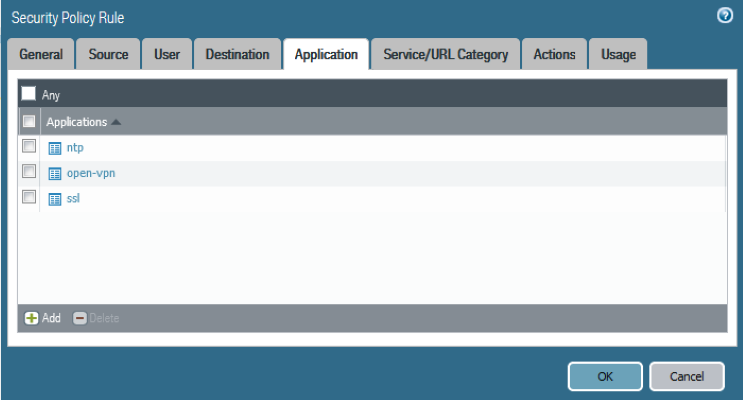
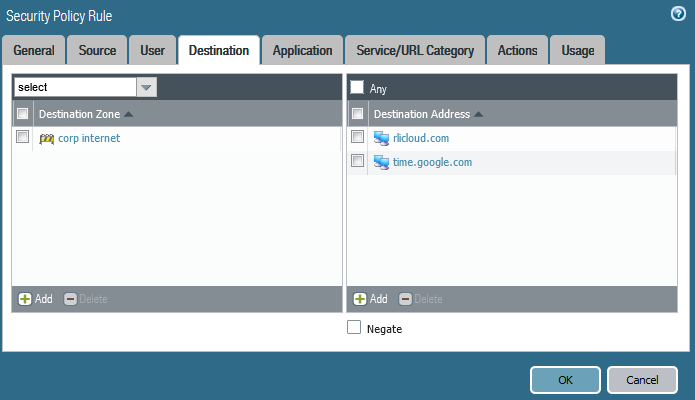
ReadyLinks resolves to rlicloud.com and cloud.readylinks.io, utilizing encrypted HTTPS port 443. Fundamentally, ReadyLinks needs to be able to resolve time (NTP), domain name service (DNS), and utilize encrypted traffic implementations on port 443 (SSL).
Devices also report telemetry and receive control messages over MQTT. This connection is made outbound to mqtt.readylinks.io on TCP port 8883 (MQTT over TLS), so that port must be permitted alongside 443.
| Source | Destination | Ports | Protocol | Direction | Description |
|---|---|---|---|---|---|
| Your network(s) | rlicloud.com, cloud.readylinks.io | 443 | TCP | Outbound | ReadyView cloud communication |
| Your network(s) | mqtt.readylinks.io | 8883 | TCP | Outbound | MQTT over TLS (MQTTS) device telemetry and control |
| Your network(s) | time.google.com | 123 | UDP | Outbound | NTP time synchronization |
#Example firewall configuration
The screenshots below show an example firewall configuration permitting this traffic.
#Connection tests
ReadyLinks devices can run tests to determine the uplink status.
#Verify device configurations via CLI
- Run
show vlan interfaceto verify management IP address information. - Run
show dnsto verify DNS information. - Run
show sntpto verify SNTP (time) settings.
#Check ReadyView connection status via CLI
- Run
show readyview connection all.
Last updated July 5, 2023