VectorBoost
How VectorBoost raises throughput on twisted-pair ReadyLinks lines by managing crosstalk in real time, how to run it locally or remotely, and how to troubleshoot it.
VectorBoost technology improves the throughput of ReadyLinks lines by allocating network resources in real time according to the current needs of traffic, overcoming the throughput limit imposed by the lines' crosstalk and providing users with much higher peak capacity just when they need it. The VectorBoost Compute Engine (VBCE) can run locally inside the ReadyLinks switch or in the cloud, leveraging additional computing power and ensuring scalability for high-density deployments.
- Instantaneous capacity adapts to real-time traffic usage
- Innovative tracking of channel parameters (HLOG, XLOG and QLN) enables real-time crosstalk management
- Increased peak capacity
VectorBoost Git repo: https://github.com/HomeGrid/GigaWireVB
#Terminology
- VBE – VectorBoost Engine
- VBD – VectorBoost Driver
- DM – Domain Master (a port on a ReadyLinks switch)
- EP – End Point (a ReadyLinks client)
- PHY – The physical rate at which packets are being transmitted
#VectorBoost engine
The VectorBoost compute "engine" is the mechanism responsible for computing the optimal transmission strategy based on the information provided by the "driver" for each instant. The strategy is then relayed to the "driver", which distributes it to all the Domain Masters.
#Engine states
| State | Description |
|---|---|
DISCOVERING_DOMAIN_WAIT_EMPTY | The VectorBoost engine sends the driver a domain discovery request to get the nodes that it should manage, but finds the domain is empty. |
ALIGNMENT_PREPARE_I | The VectorBoost engine initiates the alignment sequence. |
ALIGNMENT_PREPARE_ALL | The VectorBoost engine prepares Inter Domain Synchronization (Alignment). Alignment is required to ensure that all of the lines that belong to the same engine share the same start of the MAC cycle and the same MAC sequence number. |
ALIGNMENT_CHECK_SYNC | The VectorBoost engine checks that all the lines in the domain are synchronized. |
MEASURING_COLLECT_MEAS | This stage is where crosstalk measurements are collected from each node and relayed to the engine. |
MEASURING_MEASPLAN_END_WAIT | This stage enables the engine to measure the crosstalk impact of each line on the rest of the lines. |
BOOSTING_WAIT_TRIGGERS | The VectorBoost engine has completed the domain discovery and alignment steps and is waiting for bandwidth to be requested. |
PD_SHAPING | The VectorBoost engine is dynamically shaping the PSD of each node. The level of PSD that applies to a node is determined by the CDTA algorithm. This PSD level minimizes the crosstalk and maximizes the throughput. |
BOOSTING_WAIT_UPDATE | The VectorBoost engine is currently allocating PSD levels to certain nodes ("boosting") and is waiting for new bandwidth utilization metrics to update the PSD. |
CLOCK_RSP_WAIT | A common clock signal, usually 50Hz, is shared by all DMs in the system. The VectorBoost engine waits for the common clock to align, or semi-align, the MAC cycle start time. |
#VectorBoost driver
The VectorBoost "driver" communicates with the Domain Masters and receives data regarding the network status, such as interference and throughput requirements. This data is then transmitted to the "engine", which calculates the optimal transmission strategy.
#Topology
#Local
By default, ReadyLinks switches run VectorBoost locally on each device. You can modify this behavior by disabling VectorBoost completely or by pointing the device to a remote VectorBoost instance.
GL-24xT-P600D# configure terminal
GL-24xT-P600D(config)# readyview vectorboost local
GL-24xT-P600D(config)# exit
GL-24xT-P600D# show readyview vectorboost
VectorBoost                : Local
VectorBoost Engine Version : 3.0 r067
VectorBoost Driver Version : 3.0 r187
VectorBoost Engine Status  : BOOSTING_WAIT_TRIGGERS
VectorBoost Driver Status : CONNECTED#Remote
To use a remote VectorBoost instance instead of the local one, point the switch to the server's IP address:
GL-24xT-P600D# configure terminal
GL-24xT-P600D(config)# readyview vectorboost server-ip 10.180.20.10
GL-24xT-P600D(config)# exit
GL-24xT-P600D# show readyview vectorboost
VectorBoost : Server-IP 10.180.20.10#Examples
#Speed test
VectorBoost allows end users to run 1Gbps symmetrical speed tests by dynamically allocating bandwidth based on download and upload throughput requirements.
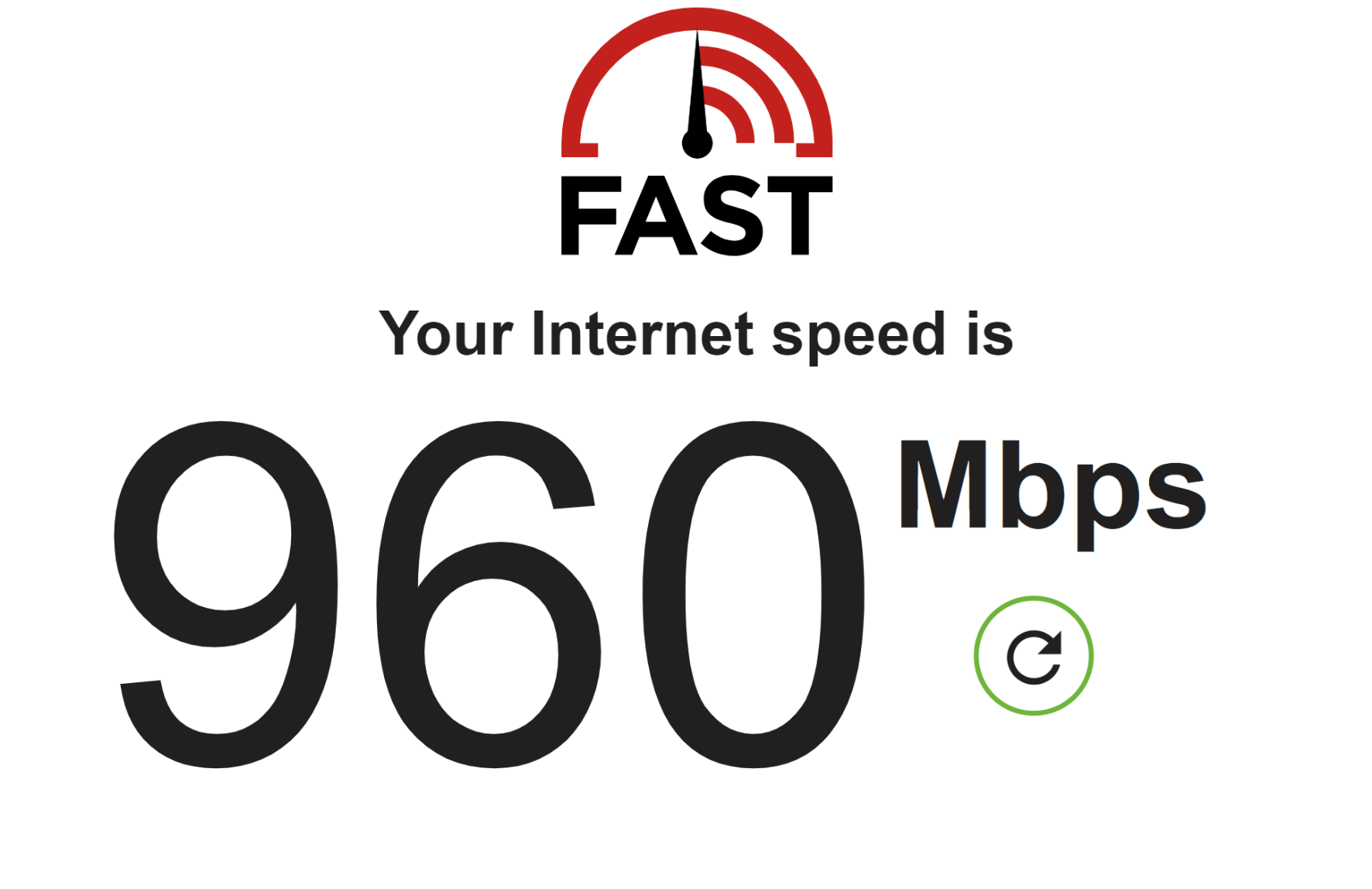
Before the speed test begins, the VectorBoost engine is in the
BOOSTING_WAIT_TRIGGERSstate and the VectorBoost driver status showsCONNECTED. The PHY rates on the port are low, as the port is not requesting any bandwidth.textGL-12xT-P600D# show readyview vectorboost VectorBoost : Local VectorBoost Engine Version : 3.0 r067 VectorBoost Driver Version : 3.0 r187 VectorBoost Engine Status : BOOSTING_WAIT_TRIGGERS VectorBoost Driver Status : CONNECTED GL-12xT-P600D# show ghn interface Interface Master_ID Link Local_MAC Remote_MAC Physical_DS/US_Speed(Mbps) Wire_Length(m) Estimated_XPUT(Mbps) Estimated_XPUT_DS/US(Mbps) ------------------------------------------------------------------------ Ghn1 97 down 0013.ba0a.5a30 0000.0000.0000 -/- -(m) -(Mbps) Ghn1.1 98 up 0013.ba0a.5a30 0013.ba0a.3b4e 246/260 3(m) 2672(Mbps) 1336/1336Once the speed test starts, the engine begins to calculate the optimal transmission strategy, allocating higher PHY rates in the downstream direction as the test starts to download. The VectorBoost engine state changes to
BOOSTING_WAIT_UPDATEand the driver status changes toPDSHAPINGas it relays the transmission strategy to the Domain Masters.textGL-12xT-P600D# show readyview vectorboost VectorBoost : Local VectorBoost Engine Version : 3.0 r067 VectorBoost Driver Version : 3.0 r187 VectorBoost Engine Status : BOOSTING_WAIT_UPDATE VectorBoost Driver Status : PDSHAPING GL-12xT-P600D# show ghn interface Interface Master_ID Link Local_MAC Remote_MAC Physical_DS/US_Speed(Mbps) Wire_Length(m) Estimated_XPUT(Mbps) Estimated_XPUT_DS/US(Mbps) ------------------------------------------------------------------------ Ghn1 97 down 0013.ba0a.5a30 0000.0000.0000 -/- -(m) -(Mbps) Ghn1.1 98 up 0013.ba0a.5a30 0013.ba0a.3b4e 1243/260 3(m) 2672(Mbps) 1336/1336Once the download portion of the speed test finishes, the upload begins. The PHY rate shifts in the upstream direction as more bandwidth is requested for the upload test.
textGL-12xT-P600D# show readyview vectorboost VectorBoost : Local VectorBoost Engine Version : 3.0 r067 VectorBoost Driver Version : 3.0 r187 VectorBoost Engine Status : BOOSTING_WAIT_UPDATE VectorBoost Driver Status : PDSHAPING GL-12xT-P600D# show ghn interface Interface Master_ID Link Local_MAC Remote_MAC Physical_DS/US_Speed(Mbps) Wire_Length(m) Estimated_XPUT(Mbps) Estimated_XPUT_DS/US(Mbps) ------------------------------------------------------------------------ Ghn1 97 down 0013.ba0a.5a30 0000.0000.0000 -/- -(m) -(Mbps) Ghn1.1 98 up 0013.ba0a.5a30 0013.ba0a.3b4e 255/1124 3(m) 2672(Mbps) 1336/1336
#Troubleshooting
#Slow speeds
Before troubleshooting VectorBoost, make sure the copper connection between the ReadyLinks switch port and the ReadyLinks client is connected properly. See the wiring instructions for cabling best practices.
Check the PHY rates on your port. In the output below, the PHY rates are high (1732/1643) but the estimated throughput is 0Mbps. This indicates that the Domain Masters are not communicating with the VectorBoost engine.
textGL-12xT-P600D# show ghn interface Interface Master_ID Link Local_MAC Remote_MAC Physical_DS/US_Speed(Mbps) Wire_Length(m) Estimated_XPUT(Mbps) Estimated_XPUT_DS/US(Mbps) ------------------------------------------------------------------------ Ghn1 97 down 0013.ba0a.5a30 0000.0000.0000 -/- -(m) -(Mbps) Ghn1.1 98 up 0013.ba0a.5a30 0013.ba0a.3b4e 1732/1643 34(m) 0(Mbps) 0/0Check the status of VectorBoost. In the output below, the engine status is
MEASURING_COLLECT_MEAS. This is an acceptable status, but if the engine is stuck in it, or in any status other thanBOOSTING_WAIT_TRIGGERS, the VectorBoost engine is not communicating with the Domain Masters.textGL-12xT-P600D# show readyview vectorboost VectorBoost : Local VectorBoost Engine Version : 3.0 r067 VectorBoost Driver Version : 3.0 r187 VectorBoost Engine Status : MEASURING_COLLECT_MEAS VectorBoost Driver Status : CONNECTEDEnsure VLAN 1 is untagged on every G.hn port. VLAN 1 is the communication network between the VectorBoost driver and the Domain Master nodes; if you remove VLAN 1 from these ports, they lose communication with VectorBoost. You can untag multiple VLANs on a G.hn port, and user traffic will traverse whichever VLAN is specified as the PVID on that port. For more on switch port settings such as PVID, see Switch ports.
textGL-12xT-P600D# configure terminal GL-12xT-P600D(config)# vlan 1 GL-12xT-P600D(vlan1)# switchport untagged ethernet Ghn1
#Restart VectorBoost
You can restart VectorBoost by disabling and re-enabling it. Note that each G.hn Domain Master restarts when you disable or enable VectorBoost.
GL-12xT-P600D# configure terminal
GL-12xT-P600D(config)# readyview vectorboost disable
GL-12xT-P600D(config)# readyview vectorboost localLast updated April 21, 2023