Clients overview
Overview and specifications of the ReadyLinks IPC client series, including features, models, default configuration, physical specifications and LED status meanings.
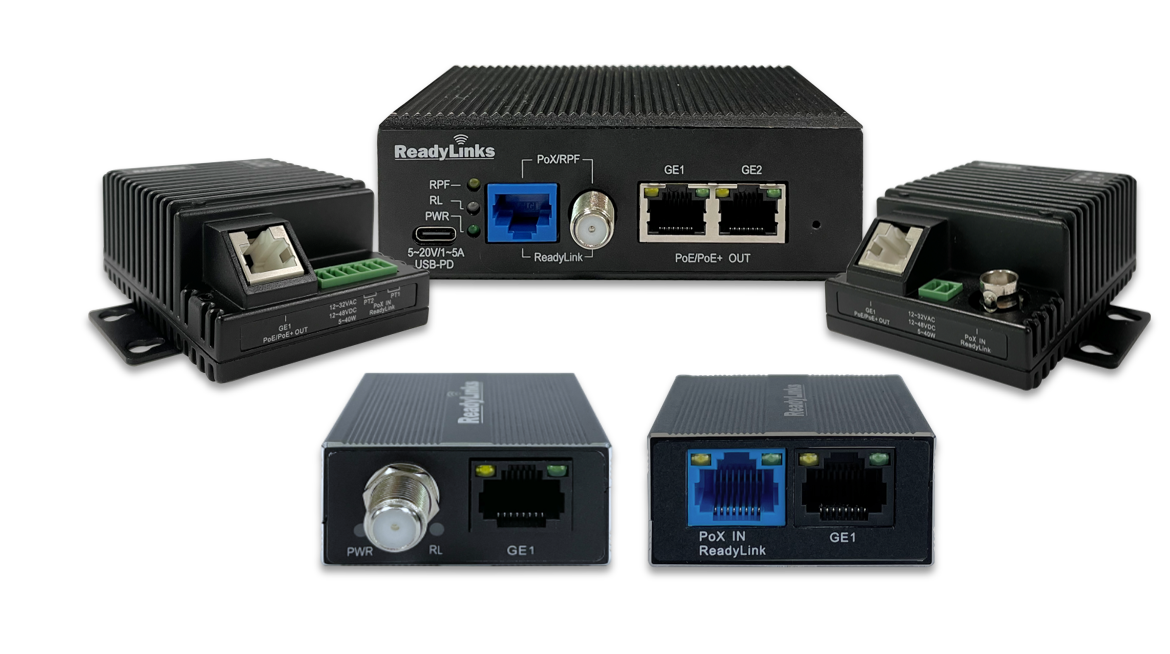
ReadyLinks IPC access switches provide Layer 2 access switching, ideal for enterprise, hospitality, ISP, and IP surveillance networks. The IPC series features a variety of form factors and PoE capabilities to meet the diverse needs of these applications. With 6 different models, capable of providing PoE, PoE+, and PoE++ power over any cable, including coax and phoneline, the IPC line is fully ready to support future network infrastructure deployments across a variety of different environments.
#Features
- Managed via ReadyView dashboard
- Automatic firmware upgrades
- SNMP/Syslog integration
- IPv4 ACL support
- DHCP Snooping
- 802.1X Authentication
- 10/100/1000 Mbps RJ45
- IGMP Snooping
- VectorBoost
- VLAN models
- Phoneline or Coax
#Models
The IPC series includes six models in three families. The IPC clients guide compares cable medium, ReadyLink ports, 1GbE RJ45 ports, PoE options and applications for every model.
IPC-2TCP-RPF series
IPC-2TCP and IPC-2TCP-RPF, with a RJ45 / Coax (F) combo ReadyLink port and two 1GbE RJ45 ports.
IPC-1 series
IPC-1T (RJ45) and IPC-1C (Coax F), each with one 1GbE RJ45 port.
IPC-4S series
IPC-4STP (Phoenix) and IPC-4SBNC (BNC), each with one 1GbE RJ45 port.
#Configuration
By default, the IPC acts as a transparent bridge, simply passing traffic to and from the connected ReadyLink switchport. However, each IPC is capable of advanced switching capabilities such as VLAN tagging, IGMP snooping, rate limits, etc.
#Physical specifications
| IPC-2TCP | IPC-2TCP-RPF | IPC-1T | IPC-1C | IPC-4STP | IPC-4SBNC | |
|---|---|---|---|---|---|---|
| Mount type | Wall, desktop | Wall, desktop | Backbox, desktop | Backbox, desktop | 4S backbox, wall | 4S backbox, wall |
| Dimensions | 4.2”(L) x 3.0”(W) x 1.4”(H) | 4.2”(L) x 3.0”(W) x 1.4”(H) | 1.9”(L) x 1.8”(W) x .86”(H) | 1.9”(L) x 1.8”(W) x .86”(H) | 3.0”(L) x 2.2”(W) x 1.4”(H) | 3.0”(L) x 2.2”(W) x 1.4”(H) |
| Power consumption | 3W | 3W | 3W | 3W | 3W | 3W |
| Operating temperature | 14 ~ 131 °F | 14 ~ 131 °F | 14 ~ 131 °F | 14 ~ 131 °F | 14 ~ 131 °F | 14 ~ 131 °F |
#LEDs
The IPC switch uses LEDs to inform the user of the device's status. While the device powers on, all the LEDs will flash indicating the device is booting up.
| Function | LED status | Meaning |
|---|---|---|
| PWR | 🟢 Green | The device is powered on. |
| ◯ Off | The device is powered off. | |
| RPF | 🟠 Orange | The IPC is providing reverse power. |
| 🟠◯ Blinking | The IPC is failing to provide reverse power. Check out the wiring instructions for some troubleshooting tips. | |
| ◯ Off | The IPC is not providing reverse power. | |
| Ethernet (GE) | 🟡 Yellow | 10Mb link |
| 🟢 Green | 1Gb link | |
| ◯ Off | No link | |
| ReadyLink Port (RL) | 🟢 Green | A data link has been established. |
| 🟢◯ Blinking | There is an unstable data link. |
#Related resources
Last updated March 23, 2021