Example: ISP customer activation/de-activation, Point-to-Multipoint (Coax)
Example NETCONF payloads an ISP can use to activate and deactivate a customer behind a G.hn modem on a coax DPU such as the GL-4xCEFH-RPF.
Example of how an Internet Service Provider can automate subscriber activation and de-activation over NETCONF. Applies to G.hn coax DPUs (e.g. GL-4xCEFH-RPF) with a G.hn modem (EP) at the customer.
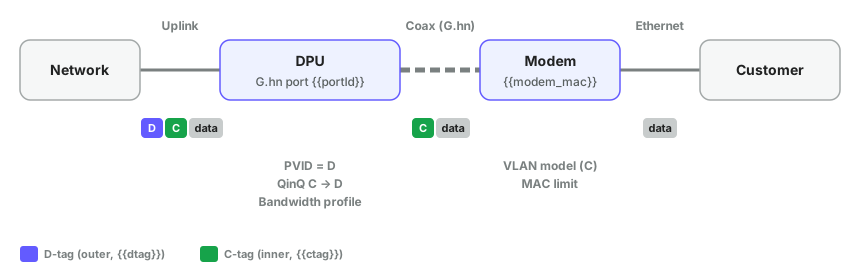
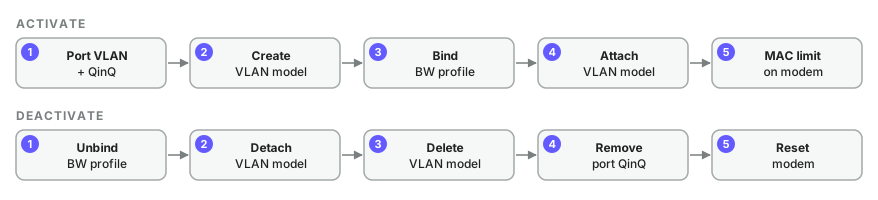
#Variables
| Variable | Example | Meaning |
|---|---|---|
portId | 3 | G.hn port (Ghn1–4 = 1–4) |
ctag | 20 | Customer (inner) VLAN |
dtag | 401 | Service (outer) VLAN |
modem_mac | 00:13:ba:0c:68:57 | Modem MAC |
bwProfileId | 1 | Bandwidth profile id (1–16) |
The VLAN model in the examples is named customer 20.
#One-time setup
#A. Global vlan-vpn
CLI: vlan-vpn
<configure xmlns="http://readylinks.io/rlos/yang/conf">
  <vlan-vpn><enabled>true</enabled></vlan-vpn>
</configure>#B. Port vlan-vpn (all G.hn ports)
CLI: interface ethernet GhnN → vlan-vpn
<ports xmlns="http://readylinks.io/rlos/yang/conf">
  <port><port-id>1</port-id><vlan-vpn><enabled>true</enabled></vlan-vpn></port>
  <port><port-id>2</port-id><vlan-vpn><enabled>true</enabled></vlan-vpn></port>
  <port><port-id>3</port-id><vlan-vpn><enabled>true</enabled></vlan-vpn></port>
  <port><port-id>4</port-id><vlan-vpn><enabled>true</enabled></vlan-vpn></port>
</ports>#C. Bandwidth profiles
CLI: ghn bandlimit profile <id> <up> <down> <qos> · Mbps 10–1500 · qos 1–4 · use --rpc-timeout=120
<configure xmlns="http://readylinks.io/rlos/yang/conf">
  <bandwidth-profiles>
    <bandwidth-profile>
      <id>1</id><download>1000</download><upload>50</upload><qos>4</qos>
    </bandwidth-profile>
    <bandwidth-profile>
      <id>2</id><download>1000</download><upload>1000</upload><qos>4</qos>
    </bandwidth-profile>
  </bandwidth-profiles>
</configure>#Activate
#Step 1 · Port VLAN + QinQ
PVID/untagged = dtag, tagged = ctag, QinQ ctag → dtag. Also enable the port if it is down.
<ports xmlns="http://readylinks.io/rlos/yang/conf"
       xmlns:nc="urn:ietf:params:xml:ns:netconf:base:1.0">
  <port>
    <port-id>3</port-id>
    <vlan>
      <vlan-type>Hybrid</vlan-type>
      <ingress-filter>Disabled</ingress-filter>
      <frame-type>Admit All</frame-type>
      <pvid nc:operation="replace">401</pvid>
      <untagged-vlans><vid nc:operation="merge">401</vid></untagged-vlans>
      <tagged-vlans><vid nc:operation="create">20</vid></tagged-vlans>
    </vlan>
    <vlan-vpn>
      <qinq nc:operation="create">
        <old-vid>20</old-vid>
        <old-low-vid>20</old-low-vid>
        <old-high-vid>20</old-high-vid>
        <new-vid>401</new-vid>
        <priority>0</priority>
      </qinq>
    </vlan-vpn>
  </port>
</ports>
old-low-vid and old-high-vid are mandatory. Set both to ctag.
#Step 2 · Create remote VLAN model
remote-type: CPE with 1 ETH port · 2 · 4 · 5 (singular "port").
<configure xmlns="http://readylinks.io/rlos/yang/conf">
  <remote-vlan-models>
    <remote-vlan-model>
      <name>customer 20</name>
      <remote-type>CPE with 1 ETH port</remote-type>
      <ports>
        <port><name>G.hn</name><pvid>1</pvid><priority>0</priority></port>
        <port><name>G1</name><pvid>20</pvid><priority>0</priority></port>
      </ports>
      <vlans>
        <vlan>
          <vid>20</vid>
          <tagged>G.hn</tagged>
          <untagged>G1</untagged>
        </vlan>
      </vlans>
    </remote-vlan-model>
  </remote-vlan-models>
</configure>
Model already exists → error. Treat as success.
#Step 3 · Bind bandwidth profile to modem
Use --rpc-timeout=120.
<configure xmlns="http://readylinks.io/rlos/yang/conf"
           xmlns:nc="urn:ietf:params:xml:ns:netconf:base:1.0">
  <bandwidth-profiles>
    <bandwidth-profile>
      <id>1</id>
      <attach>
        <mac-addresses nc:operation="create">
          <mac>00:13:ba:0c:68:57</mac>
          <port-id>3</port-id>
        </mac-addresses>
      </attach>
    </bandwidth-profile>
  </bandwidth-profiles>
</configure>#Step 4 · Attach VLAN model to modem
<configure xmlns="http://readylinks.io/rlos/yang/conf"
           xmlns:nc="urn:ietf:params:xml:ns:netconf:base:1.0">
  <remote-vlan-models>
    <remote-vlan-model>
      <name>customer 20</name>
      <remote-type>CPE with 1 ETH port</remote-type>
      <attach>
        <mac-addresses>
          <mac nc:operation="create">00:13:ba:0c:68:57</mac>
        </mac-addresses>
      </attach>
    </remote-vlan-model>
  </remote-vlan-models>
</configure>#Step 5 · MAC limit on modem
Modem must be online on portId.
<ports xmlns="http://readylinks.io/rlos/yang/conf">
  <port>
    <port-id>3</port-id>
    <ep-info>
      <mac-address>00:13:ba:0c:68:57</mac-address>
      <ports>
        <name>G1</name>
        <max-mac-learn>5</max-mac-learn>
      </ports>
    </ep-info>
  </port>
</ports>#Deactivate
All nc:operation="remove". Safe to rerun.
#Step 1 · Unbind bandwidth profile
Use --rpc-timeout=120.
<configure xmlns="http://readylinks.io/rlos/yang/conf"
           xmlns:nc="urn:ietf:params:xml:ns:netconf:base:1.0">
  <bandwidth-profiles>
    <bandwidth-profile>
      <id>1</id>
      <attach>
        <mac-addresses nc:operation="remove">
          <mac>00:13:ba:0c:68:57</mac>
        </mac-addresses>
      </attach>
    </bandwidth-profile>
  </bandwidth-profiles>
</configure>#Step 2 · Detach VLAN model
<configure xmlns="http://readylinks.io/rlos/yang/conf"
           xmlns:nc="urn:ietf:params:xml:ns:netconf:base:1.0">
  <remote-vlan-models>
    <remote-vlan-model>
      <name>customer 20</name>
      <remote-type>CPE with 1 ETH port</remote-type>
      <attach>
        <mac-addresses>
          <mac nc:operation="remove">00:13:ba:0c:68:57</mac>
        </mac-addresses>
      </attach>
    </remote-vlan-model>
  </remote-vlan-models>
</configure>#Step 3 · Delete VLAN model
<configure xmlns="http://readylinks.io/rlos/yang/conf"
           xmlns:nc="urn:ietf:params:xml:ns:netconf:base:1.0">
  <remote-vlan-models>
    <remote-vlan-model nc:operation="remove">
      <name>customer 20</name>
    </remote-vlan-model>
  </remote-vlan-models>
</configure>#Step 4 · Remove port QinQ + C-VLAN
The port keeps PVID dtag and vlan-vpn, ready for the next customer.
<ports xmlns="http://readylinks.io/rlos/yang/conf"
       xmlns:nc="urn:ietf:params:xml:ns:netconf:base:1.0">
  <port>
    <port-id>3</port-id>
    <vlan>
      <tagged-vlans><vid nc:operation="remove">20</vid></tagged-vlans>
    </vlan>
    <vlan-vpn>
      <qinq nc:operation="remove"><old-vid>20</old-vid></qinq>
    </vlan-vpn>
  </port>
</ports>#Step 5 · Reset modem
Factory reset. Use <reboot>true</reboot> for a soft reboot. Modem must be online.
<ports xmlns="http://readylinks.io/rlos/yang/conf">
  <port>
    <port-id>3</port-id>
    <ep-info>
      <mac-address>00:13:ba:0c:68:57</mac-address>
      <reset>true</reset>
    </ep-info>
  </port>
</ports>#Verify
> get --filter-xpath "/readylinks-rlos:ports/port[port-id='3']"
> get --filter-xpath "/readylinks-rlos:ports/port[port-id='3']/ep-info"
> get --filter-xpath "/readylinks-rlos:configure/remote-vlan-models/remote-vlan-model[name='customer 20']"
> get --filter-xpath "/readylinks-rlos:configure/bandwidth-profiles/bandwidth-profile[id='1']"Last updated October 20, 2026