Alarms and notifications
Every alarm a ReadyLinks switch raises, what triggers it, and how it reaches your NMS as an SNMP trap, a NETCONF notification, a gNMI update, an email, or a syslog message.
A ReadyLinks switch raises an alarm when a threshold is crossed, a link changes state, or an operator acts on the switch. Each alarm is delivered over one or more transports.
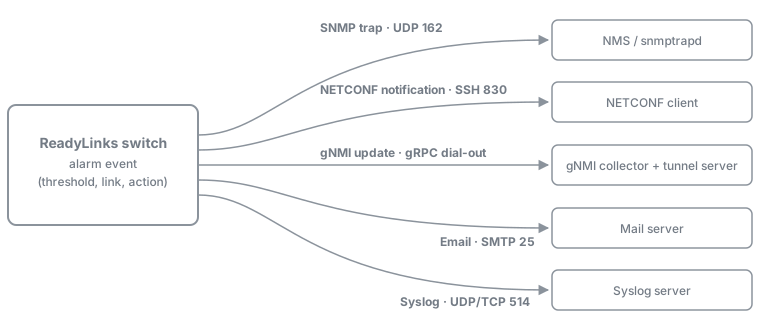
| Transport | Carries | Needs |
|---|---|---|
| SNMP trap | Every alarm marked with a trap number below | snmp-server host receivers. Traps on globally (default) and on the port, for port alarms (default) |
| NETCONF notification | Alarms with a notification-status leaf | NETCONF enabled, plus the same trap switches as the SNMP trap |
| gNMI | The same events as NETCONF | NETCONF and gRPC enabled. A gNMI Subscribe with ON_CHANGE, dial-in or through dial-out |
| Alarms marked "Email" below | smtp destination-mail ... configured | |
| Syslog | Alarms marked "Syslog" below | Entries go to the local log. They go to a remote server only after logging host ... |
NETCONF and gNMI notifications are sent whenever the SNMP trap for the same event would be sent. They don't need any trap receivers to be configured.
#Alarm reference
Trap numbers are SNMPv1 specific-trap values under enterprise 1.3.6.1.4.1.29763.8.1.911, unless the row names a standard trap. The leaf column gives the leaf under /readylinks-rlos:notification-status. "—" means the alarm does not use that transport.
#Switch
| Alarm | Trigger (default) | SNMP trap | NETCONF / gNMI leaf | Syslog | Clear event | |
|---|---|---|---|---|---|---|
| Temperature high | Board temperature ≥ 90 °C | rliSwitchTemperatureAlarm 72 | switch-temperature-status | Yes | Yes | rliSwitchTemperatureNormal 73, at ≤ 85 °C |
| CPU high | 30 s average CPU ≥ 80 % | rliSwitchCPUUtilAlarm 74 | switch-cpu-status | Yes | Yes | rliSwitchCPUUtilNormal 75, at ≤ 50 % |
| Memory low | Free memory ≤ 10 % | rliSwitchMemoryAlarm 70 | switch-memory-status | Yes | Yes | rliSwitchMemoryNormal 71, at ≥ 20 % free |
| Reboot | Reboot from CLI, web, API, MQTT, or SNMP | rliSwitchReboot 81 | switch-reboot-status | Yes | Yes | — |
| Factory reset | Reset from CLI, web, API, MQTT, or SNMP | rliSwitchReset 82 | switch-reset-status | Yes | Yes | — |
| Management session | SSH login, web login, web logout, or an operator ending a session | rliSwitchSession 78 | switch-session-status | — | — | — |
| Agent start | SNMP agent starts | coldStart (standard) | — | — | — | — |
#Ports
| Alarm | Trigger (default) | SNMP trap | NETCONF / gNMI leaf | Syslog | Clear event | |
|---|---|---|---|---|---|---|
| Link down | Port goes down | linkDown (standard) | switch-port-status | — | — | linkUp (standard) |
| Link up | Port comes up | linkUp (standard) | switch-port-status | — | — | — |
| Speed below maximum | RJ45 port with speed auto-max 100, 1000, 2500 or 5000 links up below that speed | rliSwitchPortDownSpeed 89 | switch-port-downspeed | Yes | Yes | — |
| RMON rising / falling | A user-defined rmon alarm crosses its threshold | Non-standard generic 64 / 65 (format) | — | — | — | — |
The down-speed alarm has no clear event. It is checked each time the link comes up.
#G.hn endpoints
These are sent only by switches with G.hn ports. Each one is about an endpoint (modem) behind a G.hn port.
| Alarm | Trigger (default) | SNMP trap | NETCONF / gNMI leaf | Syslog | Clear event | |
|---|---|---|---|---|---|---|
| Endpoint up | Endpoint joins and reports its basic info | linkUp 66 (enterprise) | ghn-port-status | Yes | Yes | — |
| Endpoint down | Endpoint stops answering status polls | linkDown 67 (enterprise) | ghn-port-status | Yes | Yes | Endpoint up, 66 |
| Endpoint memory low | Endpoint free memory < 10 % | rliGhnMemoryAlarm 68 | ghn-memory-status | Yes | — | rliGhnMemoryNormal 69, at > 20 % free |
| Endpoint CPU high | Endpoint CPU > 80 % | rliGhnCPUUtilAlarm 76 | ghn-cpu-status | Yes | — | rliGhnCPUUtilNormal 77, at < 50 % |
| Endpoint reboot | Endpoint reboot from web, API, MQTT, or SNMP | rliGhnReboot 79 | ghn-reboot-status | Yes | Yes | — |
| Endpoint reset | Endpoint factory reset from web, API, MQTT, or SNMP | rliGhnReset 80 | ghn-reset-status | Yes | Yes | — |
| Upgrade done, restarting | Endpoint firmware upgrade succeeded and the endpoint is told to restart | rliGhnUpgradeWillRestart 83 | ghn-upgrade-will-restart-status | — | — | — |
| Restart command accepted | Endpoint accepted the post-upgrade restart command | rliGhnUpgradeRestarted 84 | ghn-upgrade-restarted-status | — | — | — |
| Endpoint temperature | Hottest endpoint ≥ 120 °C | — | — | — | Yes | Log entry at ≤ 115 °C |
Trap 84 is sent once the endpoint accepts the restart command. It doesn't wait for the endpoint to come back online. To confirm an endpoint is back, watch for its endpoint-up trap (66).
#PoE
These are sent only by PoE switches with LLDP-MED power management: GL-24XEP, GL-24XEP2, and GL-24X / GL-240D with the E profile.
| Alarm | Trigger | SNMP trap | NETCONF / gNMI leaf | Syslog | Clear event | |
|---|---|---|---|---|---|---|
| Power budget exceeded | Port turned off because the PoE budget is used up | rliPortPowerExceedBudget 85 | — | — | Yes | rliPortPowerRestoredFromExceeded 86 |
| PD overload | Powered device draws more than its allocated power | rliPortPowerOverload 87 | — | — | Yes | rliPortPowerRstoredFromOverload 88 |
#Gating
Two switches control the SNMP traps. NETCONF and gNMI follow the same switches. Email and syslog follow them for some alarms and ignore them for others.
| Alarm | Global trap switch | Per-port trap switch | Email and syslog when traps are off |
|---|---|---|---|
| Switch temperature, CPU, memory | Required | — | Not sent |
| Switch reboot, reset | Required | — | Still sent |
| Management session | Required | — | — |
| Port link up / down | Required | Required | — |
| Port speed below maximum | Required | Required | Still sent |
| G.hn endpoint up / down | Required | Required | Still sent |
| G.hn memory, CPU, reboot, reset | Required | — | Still sent |
| G.hn upgrade (83, 84) | Required | — | — |
| PoE | Required | Required | Syslog still sent |
| RMON | Required | — | — |
Agent start (coldStart) | Required | — | — |
- Global trap switch:
snmp-server traps, which is on by default. - Per-port trap switch:
snmp-server trapsin interface mode, which is on for every port by default. - G.hn endpoint temperature: this is a log entry only, and no trap switch applies to it.
#Behaviour
- One event per change. An alarm fires once, when its condition starts, and the matching clear fires once, when the condition ends. Nothing repeats while a condition stays active.
- Hysteresis. Thresholds have separate alarm and normal values, so an alarm can't flap around a single threshold. Change them with the
alarmcommands (see Thresholds). - After a reboot. Alarm state is not kept across a reboot. A condition that is still true after the switch restarts raises a new alarm. At startup the switch sends
coldStart, thenlinkUpfor every port that is up. - Turning traps back on. Switch temperature, CPU, and memory are only checked while the global trap switch is on. Turning traps back on raises an alarm straight away for any of those conditions that is still true.
#Reference pages
Last updated October 21, 2026