How to use NETCONF on ReadyLinks devices
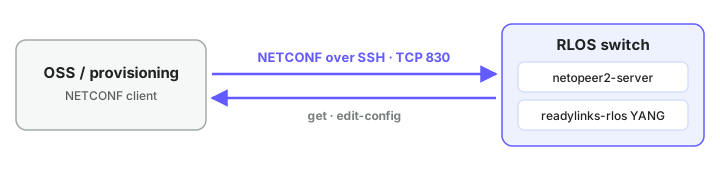
Enable NETCONF on the switch, connect with netopeer2-cli, then read with get and write with edit-config.
#1. Enable
On the switch CLI:
shell
configure terminal
netconf enable
netconf username root password <password>
end- Username must be
root. netconf disableturns it off.
#2. Connect
Any NETCONF client works. Example with netopeer2-cli (Ubuntu: sudo apt install netopeer2):
shell
netopeer2-cli
> connect --ssh --port 830 --login root --host <switch-ip>#3. Read
shell
> get --filter-xpath <path>| Path | Returns |
|---|---|
/readylinks-rlos:ports | Ports: VLAN, QinQ, attached modems |
/readylinks-rlos:ports/port[port-id='3'] | One port |
/readylinks-rlos:configure/vlan-vpn | Global QinQ |
/readylinks-rlos:configure/remote-vlan-models | Remote VLAN models |
/readylinks-rlos:configure/bandwidth-profiles | Bandwidth profiles + bindings |
/readylinks-rlos:components | Model, versions, serial, base MAC |
/ietf-interfaces:interfaces-state | Port admin / oper state |
/openconfig-system:system | CPU, memory, hostname |
An empty match is reported as an error. It means "no data".
#4. Write
- Save the payload as
step.xml. - Send it:
shell
> edit-config --target=running --defop=none --config=step.xml| Flag | Why |
|---|---|
--target=running | Applies live |
--defop=none | Only nodes with an nc:operation change |
--rpc-timeout=120 | Bandwidth-profile writes (slow) |
#nc:operation
Declare xmlns:nc="urn:ietf:params:xml:ns:netconf:base:1.0" on the root element.
| Operation | Does | If node exists | If node is absent |
|---|---|---|---|
create | Add | Error | Adds |
merge | Add or update | Updates | Adds |
replace | Overwrite | Overwrites | Adds |
remove | Delete | Deletes | No-op (use for teardown) |
#Enable a port
Port admin state lives in ietf-interfaces. Use the port name (Ghn3, Ethernet0/10, ...).
xml
<interfaces xmlns="urn:ietf:params:xml:ns:yang:ietf-interfaces">
  <interface>
    <name>Ghn3</name>
    <type xmlns:ianaift="urn:ietf:params:xml:ns:yang:iana-if-type">ianaift:ethernetCsmacd</type>
    <enabled>true</enabled>
  </interface>
</interfaces>#5. Save
Changes auto-save to flash within 30 s. Don't power-cycle sooner. To save now:
xml
<configure xmlns="http://readylinks.io/rlos/yang/conf">
  <system><save_config>true</save_config></system>
</configure>#Rules
| Item | Value |
|---|---|
| Namespace | http://readylinks.io/rlos/yang/conf |
| MAC format | 00:13:ba:0c:68:57 (colons, lower case) |
| VLAN lists | One <vid> per VLAN, not comma strings |
| Bad values | Rejected at edit-config with an rpc-error |
#Examples: ISP customer automation
Edit this page on GitLab
Last updated October 20, 2026