RADIUS and AAA
ReadyLinks switches use RADIUS to decide which devices may use a port and to check the credentials of operators who log in to the switch.
#Overview
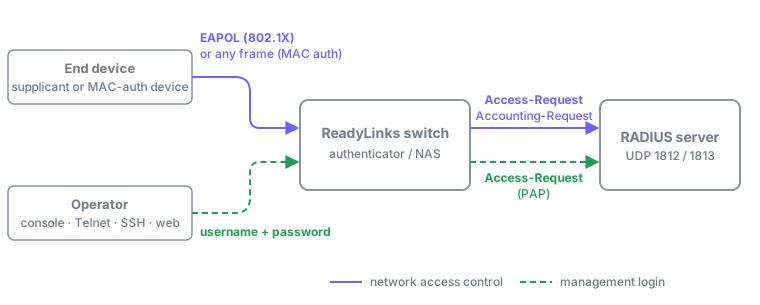
RADIUS does two independent jobs on a ReadyLinks switch. Each has its own server list, shared secret, and commands, so you can point them at the same RADIUS server or at different ones.
| Network access control | Management login | |
|---|---|---|
| Who authenticates | Devices plugged into switch ports | Operators logging in to the switch |
| Methods | 802.1X and MAC authentication | Username and password (PAP) |
| Configured in | dot1x view, mac-authentication | radius-server host, radius, aaa authentication login |
| Servers | One authentication server, one accounting server | Up to five, tried in order |
| Accounting | Start, Interim-Update, Stop | None |
#802.1X port authentication
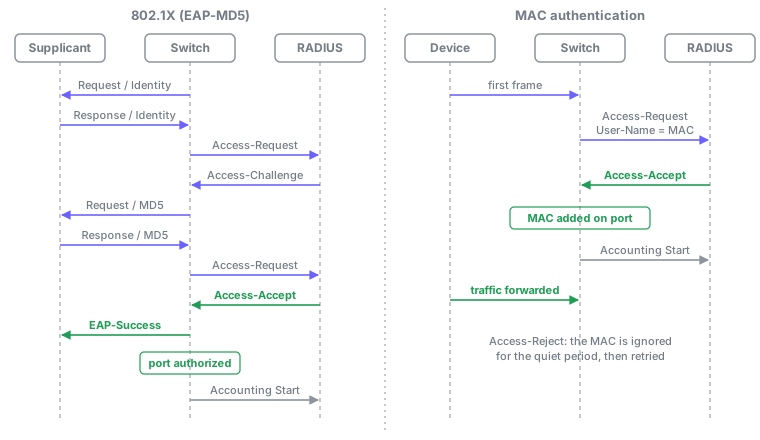
With 802.1X, the switch is the authenticator. A device's 802.1X client (the supplicant) sends EAP over the LAN (EAPOL) to the switch, and the switch relays each EAP message to the RADIUS server inside an Access-Request. Until the server returns Access-Accept, the port passes only EAPOL frames.
- EAP method. The switch relays EAP-Identity and EAP-MD5. Configure the RADIUS server to start EAP-MD5 and configure supplicants to use it. EAP-MD5 requires the server to hold each user's password in cleartext.
- Port-based. Authorization applies to the whole port. After one supplicant authenticates, the port forwards traffic from any device behind it. To authorize each device on a shared port individually, use MAC authentication instead.
- Port-control modes.
autoauthenticates;forceauthorizedalways forwards;forceunauthorizednever forwards. Enabling 802.1X on a port withdot1_xsets it toforceauthorized, so setautoon every port that should authenticate. Leave uplinks and ports facing other switches onforceauthorized. - Re-authentication. With
dot1_x re-authenticationon a port, the switch re-authenticates the session everyreauth-period. If re-authentication fails, the port is unauthorized and an Accounting Stop is sent. - Guest VLAN. Set a guest VLAN in the
dot1xview and enable it per port withdot1_x guest-vlan. While a port inautomode is not authorized, the switch sets the port's PVID to the guest VLAN. The VLAN must already exist. - Link aggregation. Per-port 802.1X settings on a LAG member are applied to every member of the LAG.
#Timers and limits
All are set in the dot1x view. no timeout <name> and no max-req restore the default.
| Setting | Command | Range | Default | Meaning |
|---|---|---|---|---|
| Quiet period | timeout quiet-period | 1-65535 s | 60 | Wait after a failed authentication before trying again |
| Transmit period | timeout tx-period | 1-65535 s | 30 | Interval between EAP-Request/Identity frames |
| Supplicant timeout | timeout supplicant | 1-300 s | 30 | Wait for the supplicant to answer |
| Server timeout | timeout server | 1-300 s | 30 | Wait for the RADIUS server to answer |
| Re-authentication period | timeout reauth-period | 60-7200 s | 3600 | Interval between re-authentications |
| Maximum attempts | max-req | 1-10 | 2 | Authentication attempts before the port stays unauthorized |
#Commands
| View | Command | Purpose |
|---|---|---|
dot1x | system-auth-control | Enable 802.1X on the switch |
dot1x | radius-server authentication host <ip> auth-port <port> key <key> | Authentication server (port usually 1812) |
dot1x | radius-server accounting host <ip> acct-port <port> key <key> | Accounting server (port usually 1813) |
dot1x | guest-vlan <vlan-id> | Guest VLAN for unauthorized ports |
| Port | dot1_x | Enable 802.1X on the port (forceauthorized) |
| Port | dot1_x port-control auto | Require authentication |
| Port | dot1_x re-authentication | Re-authenticate periodically |
| Port | dot1_x guest-vlan | Use the guest VLAN on this port |
| Port | no dot1x | Disable 802.1X on the port |
The per-port commands use the keyword dot1_x, with an underscore; the no forms use dot1x.
Keys are 1-15 characters and can't contain ', ", \, or &. If the authentication and accounting servers have the same IP address, they must use different ports and the same key.
#VLAN placement
The switch does not move a port or device into a VLAN based on RADIUS reply attributes. Devices authenticated by 802.1X or by MAC authentication use the port's configured VLAN (PVID); the guest VLAN is the only VLAN the 802.1X process applies. An Access-Accept that contains Tunnel-Type is treated as a failed authentication, so don't return Tunnel-Type, Tunnel-Medium-Type, or Tunnel-Private-Group-ID to these switches.
#MAC authentication
MAC authentication (sometimes called MAB) authorizes devices by their MAC address, with no client software. Use it for printers, cameras, sensors, and other devices that can't run 802.1X, or to authorize each device individually on a port shared by several devices.
- Trigger. On a port with MAC authentication enabled, the first frame from a source MAC the switch hasn't authorized starts an Access-Request.
- Request format.
User-Nameis the MAC as 12 lowercase hex digits with no separators, for example0a1b2c3d4e5f.Calling-Station-Idis the same MAC as0a1b-2c3d-4e5f. The request carries no User-Password: it contains an EAP-Message holding an EAP-Response/Identity with the same MAC string, plus a Message-Authenticator. - What the server must do. Answer this first Access-Request directly with Access-Accept or Access-Reject based on
User-Name. Don't start an EAP method (Access-Challenge) for these requests, and don't expect a password. See the FreeRADIUS example. - On Access-Accept. The switch adds the MAC to its forwarding table on that port, in the VLAN the device's traffic arrives on (the port's VLAN), and sends an Accounting Start.
- On Access-Reject. The MAC is ignored for the quiet period. After that, the next frame from it starts a new request.
- Per device. Each MAC is authorized on its own, so several devices on one port are each accepted or rejected independently. While a MAC is known on one port, the same MAC in the same VLAN on another port is ignored.
- Capacity. The switch tracks up to 255 MAC addresses for MAC authentication, shared across all ports.
- Bypass. A MAC address with a static entry in the forwarding table is not authenticated.
- RADIUS servers. MAC authentication uses the authentication and accounting servers configured in the
dot1xview. Enable MAC authentication before setting them.
#Timers
All are global, and can be set only while MAC authentication is enabled.
| Setting | Command | Range | Default | Meaning |
|---|---|---|---|---|
| Offline detect | mac-authentication timer offline-detect | 1-65535 s | 300 | How often the switch checks that an authorized MAC is still present. If it's gone, the MAC is removed and an Accounting Stop is sent. |
| Quiet | mac-authentication timer quiet | 1-3600 s | 60 | How long a rejected MAC is ignored |
| Server timeout | mac-authentication timer server-timeout | 1-65535 s | 100 | How long to wait for the RADIUS server. With no answer, the next frame from the MAC retries. |
When a port's link goes down, every MAC authorized on it is removed and an Accounting Stop is sent for each.
#Commands
| View | Command | Purpose |
|---|---|---|
| Config | mac-authentication | Enable MAC authentication on the switch |
| Config | mac-authentication timer <timer> <seconds> | Set a timer |
| Port | mac-authentication | Enable MAC authentication on the port |
| Port | no mac-authentication | Disable it on the port |
| Config | no mac-authentication | Disable it on the switch |
#802.1X or MAC authentication
802.1X and MAC authentication are mutually exclusive for the whole switch, not per port. Enabling one while the other is enabled is refused. Pick one method per switch.
#Accounting
For both 802.1X and MAC authentication, the switch sends Accounting-Request packets to the server set with radius-server accounting host in the dot1x view, using the accounting key.
- Start when a session is authorized: an 802.1X port, or a MAC address.
- Interim-Update when the same user re-authenticates successfully.
- Stop when the session ends, with the counters for the session.
| Event | Acct-Terminate-Cause |
|---|---|
| Link down, or 802.1X disabled on the switch | Lost-Carrier |
Port control changed to forceauthorized or forceunauthorized | Admin-Reset |
| MAC address no longer present (offline detect) | Admin-Reset |
| Re-authentication fails, or an authorized MAC is rejected | Session-Timeout |
| Switch reboot | NAS-Request |
Byte and packet counts in a Stop come from the port's counters for the duration of the session. If the Access-Accept contained a Class attribute, the switch returns it unchanged in every Accounting-Request for that session.
#RADIUS attributes
#Sent by the switch for 802.1X and MAC authentication
| Attribute | # | Value |
|---|---|---|
| User-Name | 1 | 802.1X: the identity the supplicant sent (up to 32 characters). MAC authentication: the MAC as 12 lowercase hex digits. |
| NAS-IP-Address | 4 | The switch's management IPv4 address |
| NAS-Port | 5 | A number derived from the switch port |
| Service-Type | 6 | Framed-User (2) |
| Framed-Protocol | 7 | PPP (1) |
| Framed-MTU | 12 | 1400, in the first Access-Request of an exchange |
| State | 24 | Copied from the previous Access-Challenge |
| Class | 25 | Accounting only: copied from the Access-Accept |
| Called-Station-Id | 30 | The switch's MAC, uppercase, as AA-BB-CC-DD-EE-FF |
| Calling-Station-Id | 31 | The device's MAC, lowercase, as aabb-ccdd-eeff |
| NAS-Identifier | 32 | 112233 |
| NAS-Port-Type | 61 | Ethernet (15) |
| Connect-Info | 77 | 802.1X: CONNECT Ethernet 802.3 |
| EAP-Message | 79 | The EAP packet from the supplicant, or the synthesized Identity for MAC authentication |
| Message-Authenticator | 80 | In every Access-Request |
| Tunnel-Type, Tunnel-Medium-Type, Tunnel-Private-Group-ID | 64, 65, 81 | 802.1X requests after the first: fixed values VLAN, IEEE-802, 1 |
| Acct-Status-Type, Acct-Session-Id, Acct-Authentic | 40, 44, 45 | Every Accounting-Request. Acct-Authentic is RADIUS. |
| Acct-Delay-Time, Acct-Session-Time, Acct-Input/Output-Octets, Acct-Input/Output-Packets, Acct-Terminate-Cause | 41, 46, 42, 43, 47, 48, 49 | Accounting Stop |
NAS-Port isn't a stable port identifier across an exchange. Key server policy on User-Name, Calling-Station-Id, or NAS-IP-Address instead.
#Acted on by the switch
The switch checks the Response Authenticator of every reply against the shared secret and discards replies that don't match.
| Reply or attribute | Effect |
|---|---|
| Access-Accept | 802.1X: the port is authorized. MAC authentication: the MAC is added on the port. |
| Access-Reject | Authentication fails; the quiet period starts |
| Access-Challenge | 802.1X: its EAP-Message is relayed to the supplicant |
| EAP-Message (79) | Relayed to the supplicant (802.1X) |
| State (24) | Returned in the next Access-Request |
| Class (25) | Returned in accounting for the session |
| Tunnel-Type (64) | Treated as a failed authentication; see VLAN placement |
Other attributes in the reply are ignored.
#Management login
Operators can be authenticated against RADIUS when they log in on the console, Telnet, SSH, the web interface, or NETCONF. This is separate from 802.1X and MAC authentication: it uses its own servers and keys.
- Servers. Add up to five with
radius-server host <ipv4> port <port> [key <key> [timeout <seconds>]], orradius-server hostipv6for an IPv6 server. The switch tries them in the order they were added and logs the operator in on the first Access-Accept. - Global settings. These apply to every server that doesn't set its own value.
| Setting | Command | Range | Default |
|---|---|---|---|
| Shared key | radius key <key> | 1-63 characters | none |
| Timeout per attempt | radius timeout <seconds> | 1-1000 s | 5 |
| Attempts per server | radius retransmit <count> | 1-1000 | 3 |
| Dead time | radius deadtime <minutes> | 0-1440 min | 0 |
When more than one server is configured, a server that doesn't answer is skipped for the dead time.
- Login method per channel.
aaa authentication login <channel> <method>sets one method for each ofconsole,telnet,ssh,http, andnetconf. The method islocal,radius, ortacacs.show aaalists the current methods. - Fallback. Local accounts are used only on channels set to
local, and on the console when no RADIUS server answers. Telnet, SSH, and web logins fail if no server answers, so keep at least one local Admin account and keep the console onlocalwhile you test. - Privilege level. The Access-Accept sets the operator's level. A Cisco-AVPair (vendor 9) of
shell:priv-lvl=1,2, or3gives Visitor, User, or Admin. Without one, Service-Type Administrative-User gives Admin, and anything else gives Visitor. See CLI access and user levels. - Request contents. User-Name, User-Password (hidden per RFC 2865), Service-Type Login-User, NAS-Port-Type Virtual, NAS-IP-Address (IPv4 servers), NAS-Identifier
ReadyLinks, and Message-Authenticator. If the reply contains a Message-Authenticator, the switch verifies it. An Access-Challenge is treated as a reject.
GL-24xT-P600D# configure terminal
GL-24xT-P600D(config)# radius-server host 192.0.2.20 port 1812 key Ex4mpleKey
The configuration of RADIUS server has been completed successfully.
GL-24xT-P600D(config)# radius-server host 192.0.2.21 port 1812 key Ex4mpleKey
The configuration of RADIUS server has been completed successfully.
GL-24xT-P600D(config)# radius deadtime 10
The configuration of RADIUS's deadtime has been completed successfully.
GL-24xT-P600D(config)# aaa authentication login ssh radius
The configuration has been completed successfully.
GL-24xT-P600D(config)# aaa authentication login http radius
The configuration has been completed successfully.
GL-24xT-P600D(config)# aaa authentication login console local
The configuration has been completed successfully.
GL-24xT-P600D(config)# end
GL-24xT-P600D# show radius
GL-24xT-P600D# show radius-server
GL-24xT-P600D# show aaa#Example: FreeRADIUS
This example uses FreeRADIUS 3 at 192.0.2.20 and a switch at 192.0.2.10. It authenticates one 802.1X user and one MAC-authenticated device on access ports, and one operator login.
FreeRADIUS identifies the switch by its source address and uses one secret per client. If the same server handles access control and management login for a switch, give both the same key, at most 15 characters.
clients.conf. The switch sends a Message-Authenticator in every Access-Request, so you can require it.
client rl-access-01 {
    ipaddr = 192.0.2.10
    secret = Ex4mpleKey
    require_message_authenticator = yes
}mods-available/eap. Start EAP-MD5 for 802.1X supplicants.
eap {
    default_eap_type = md5
    md5 {
    }
    # ...
}sites-available/default, authorize section. Answer MAC authentication requests before the eap module claims them. This matches any User-Name of exactly 12 lowercase hex digits, so don't give 802.1X users names of that form.
authorize {
    filter_username
    preprocess

    # MAC authentication from ReadyLinks switches
    if (&User-Name =~ /^[0-9a-f]{12}$/) {
        files
        if (notfound) {
            reject
        }
        return
    }

    eap {
        ok = return
    }
    files
    # ... rest of the default section
}mods-config/files/authorize. One MAC-authenticated device, one 802.1X user, and one operator who logs in as Admin.
# MAC authentication: the device MAC as 12 lowercase hex digits
0a1b2c3d4e5f    Auth-Type := Accept

# 802.1X user (EAP-MD5 needs the cleartext password)
alice           Cleartext-Password := "example-password"

# Operator login to the switch
netops          Cleartext-Password := "example-password", NAS-Identifier == "ReadyLinks"
                Service-Type := Administrative-User
Switch, 802.1X.
GL-24xT-P600D# configure terminal
GL-24xT-P600D(config)# dot1x
GL-24xT-P600D(dot1x)# system-auth-control
802.1x has been enabled
Configuration completed successfully.
GL-24xT-P600D(dot1x)# radius-server authentication host 192.0.2.20 auth-port 1812 key Ex4mpleKey
Configuration completed successfully.
GL-24xT-P600D(dot1x)# radius-server accounting host 192.0.2.20 acct-port 1813 key Ex4mpleKey
Configuration completed successfully.
GL-24xT-P600D(dot1x)# end
GL-24xT-P600D# configure terminal
GL-24xT-P600D(config)# interface ethernet Ghn5
GL-24xT-P600D(Ghn5)# dot1_x
802.1x has been enabled on port Ghn5
GL-24xT-P600D(Ghn5)# dot1_x port-control auto
Configuration completed successfully.
GL-24xT-P600D(Ghn5)# dot1_x re-authentication
Configuration completed successfully.
GL-24xT-P600D(Ghn5)# end
GL-24xT-P600D# write
Switch, MAC authentication. Use this instead of the 802.1X block, not alongside it.
GL-24xT-P600D# configure terminal
GL-24xT-P600D(config)# mac-authentication
Configuration has been completed successfully!
GL-24xT-P600D(config)# dot1x
GL-24xT-P600D(dot1x)# radius-server authentication host 192.0.2.20 auth-port 1812 key Ex4mpleKey
Configuration completed successfully.
GL-24xT-P600D(dot1x)# radius-server accounting host 192.0.2.20 acct-port 1813 key Ex4mpleKey
Configuration completed successfully.
GL-24xT-P600D(dot1x)# end
GL-24xT-P600D# configure terminal
GL-24xT-P600D(config)# interface ethernet Ghn1
GL-24xT-P600D(Ghn1)# mac-authentication
Configuration has been completed successfully!
GL-24xT-P600D(Ghn1)# end
GL-24xT-P600D# write
For the operator login, use the commands in Management login with 192.0.2.20 as the server.
#Verify and troubleshoot
| Command | Shows |
|---|---|
show dot1x status | Global 802.1X settings |
show dot1x interface | 802.1X state of every port |
show dot1x interface ethernet <port> | 802.1X state of one port |
show dot1x radius-server | Authentication and accounting servers |
show mac-authentication configuration | Global state, timers, and per-port enable |
show mac-authentication information | VLAN, MAC, port, and Authorized/Unauthorized state of each tracked MAC |
show radius | Management login timeout, retransmit, dead time, and key |
show radius-server | Management login servers |
show aaa | Login method for each channel |
Common causes of failure:
- Shared secret mismatch. The switch discards replies that don't verify against its key, so a wrong key looks like a server that never answers. The server usually logs a Message-Authenticator or shared-secret error.
- Commands rejected with
802.1x is disabled.Runsystem-auth-control(or enablemac-authentication) before setting servers, keys, guest VLAN, or timers. - 802.1X or MAC authentication won't enable. The other one is enabled on the switch; they are mutually exclusive.
- MAC-authenticated device never authorized. The server is starting an EAP method instead of answering directly, or its policy expects a User-Password, or it expects a different MAC format (colons, hyphens, uppercase). The switch sends 12 lowercase hex digits with no password.
- 802.1X supplicant never authorized. The supplicant or server is set to an EAP method other than EAP-MD5, or the server doesn't have the user's cleartext password.
- Access-Accept but the port stays unauthorized. The Accept contains Tunnel-Type. Remove the VLAN attributes from the reply.
- New devices ignored with MAC authentication. The switch already tracks 255 MAC addresses, or the MAC is in its quiet period after a reject.
- No accounting records. The accounting server or key in the
dot1xview is not set to your server. - Operators locked out over SSH or the web. No management login server answers and those channels don't fall back to local accounts. Log in on the console, which falls back to local accounts when no server answers.
Last updated October 21, 2026