Example: ISP customer activation/de-activation, Point-to-Point (Ethernet / Phoneline)
Example NETCONF payloads an ISP can use to activate and deactivate a customer on a switch access port with no modem, such as the GL-24xEP+ or GL-xxT phoneline switches.
Example of how an Internet Service Provider can automate subscriber activation and de-activation over NETCONF. Applies to switches with no modem: Ethernet switches (e.g. GL-24xEP+) and phoneline / twisted-pair GL-xxT switches.
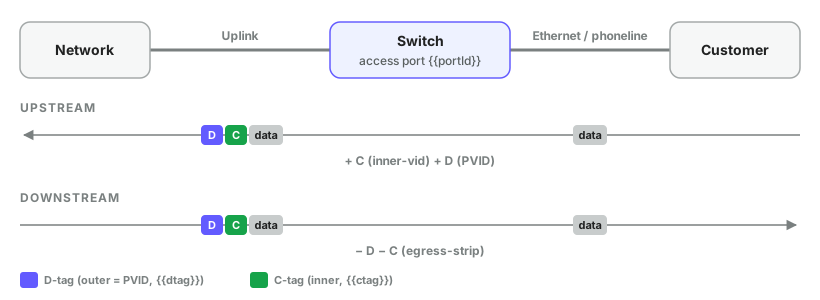
#Variables
| Variable | Example | Meaning |
|---|---|---|
portId | 10 | Access port (Ethernet0/10) |
uplinkId | 26 | Uplink port (rj45/G2) |
dtag | 36 | Service (outer) VLAN = port PVID |
ctag | 77 | Customer (inner) VLAN |
priority | 5 | 802.1p for both added tags (0–7) |
cpe_mac | 00:11:22:33:44:55 | Allowed customer MAC |
Port ids: read /readylinks-rlos:ports on the switch.
#One-time setup
#A. Global vlan-vpn
CLI: vlan-vpn
<configure xmlns="http://readylinks.io/rlos/yang/conf">
  <vlan-vpn><enabled>true</enabled></vlan-vpn>
</configure>#B. Tag D-tag on uplink
CLI: vlan 36 → switchport tagged ethernet rj45/G2
<ports xmlns="http://readylinks.io/rlos/yang/conf"
       xmlns:nc="urn:ietf:params:xml:ns:netconf:base:1.0">
  <port>
    <port-id>26</port-id>
    <vlan><tagged-vlans><vid nc:operation="merge">36</vid></tagged-vlans></vlan>
  </port>
</ports>#Activate
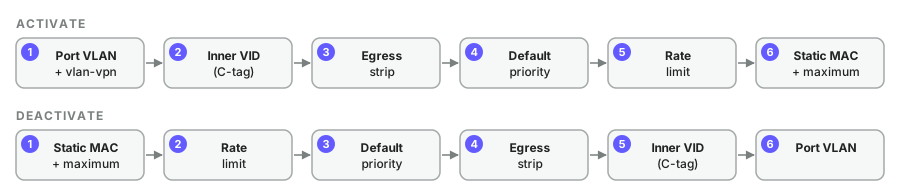
#Step 1 · Port VLAN + vlan-vpn
CLI: switchport tagged ethernet 0/10 · vlan-vpn · switchport pvid 36
Also enable the port if it is down.
<ports xmlns="http://readylinks.io/rlos/yang/conf"
       xmlns:nc="urn:ietf:params:xml:ns:netconf:base:1.0">
  <port>
    <port-id>10</port-id>
    <vlan>
      <pvid nc:operation="replace">36</pvid>
      <tagged-vlans><vid nc:operation="merge">36</vid></tagged-vlans>
    </vlan>
    <vlan-vpn><enabled>true</enabled></vlan-vpn>
  </port>
</ports>#Step 2 · Inner VID (upstream C-tag)
CLI: dtag inner-vid 77
<ports xmlns="http://readylinks.io/rlos/yang/conf">
  <port>
    <port-id>10</port-id>
    <dtag><inner-vid>77</inner-vid></dtag>
  </port>
</ports>#Step 3 · Egress strip (downstream)
CLI: dtag egress-strip service-outer-vid 36 service-inner-vid 77
<ports xmlns="http://readylinks.io/rlos/yang/conf"
       xmlns:nc="urn:ietf:params:xml:ns:netconf:base:1.0">
  <port>
    <port-id>10</port-id>
    <dtag>
      <egress-strip nc:operation="create">
        <service-outer-vid>36</service-outer-vid>
        <service-inner-vid>77</service-inner-vid>
      </egress-strip>
    </dtag>
  </port>
</ports>#Step 4 · Default priority
CLI: priority 5
<ports xmlns="http://readylinks.io/rlos/yang/conf">
  <port>
    <port-id>10</port-id>
    <default-priority>5</default-priority>
  </port>
</ports>#Step 5 · Rate limit
CLI: line-rate ingress rate 50m · line-rate egress rate 1000m
Ingress = customer upload, egress = download. Values come from the firmware rate menu (disable = off).
<ports xmlns="http://readylinks.io/rlos/yang/conf">
  <port>
    <port-id>10</port-id>
    <rate-limit>
      <ingress>50Mbps</ingress>
      <egress>1000Mbps</egress>
    </rate-limit>
  </port>
</ports>#Step 6 · Static MAC + port-security maximum
CLI: mac-address static 0011.2233.4455 vlan 36 · port-security maximum 1
<ports xmlns="http://readylinks.io/rlos/yang/conf"
       xmlns:nc="urn:ietf:params:xml:ns:netconf:base:1.0">
  <port>
    <port-id>10</port-id>
    <static-macs>
      <static-mac nc:operation="create">
        <mac>00:11:22:33:44:55</mac>
        <vlan-id>36</vlan-id>
      </static-mac>
    </static-macs>
    <port-security><maximum>1</maximum></port-security>
  </port>
</ports>#Deactivate
All nc:operation="remove". Safe to rerun.
#Step 1 · Static MAC + maximum
CLI: no mac-address static ... · no port-security maximum
<ports xmlns="http://readylinks.io/rlos/yang/conf"
       xmlns:nc="urn:ietf:params:xml:ns:netconf:base:1.0">
  <port>
    <port-id>10</port-id>
    <static-macs>
      <static-mac nc:operation="remove">
        <mac>00:11:22:33:44:55</mac>
        <vlan-id>36</vlan-id>
      </static-mac>
    </static-macs>
    <port-security><maximum nc:operation="remove"/></port-security>
  </port>
</ports>#Step 2 · Rate limit
CLI: no line-rate ingress · no line-rate egress
<ports xmlns="http://readylinks.io/rlos/yang/conf"
       xmlns:nc="urn:ietf:params:xml:ns:netconf:base:1.0">
  <port>
    <port-id>10</port-id>
    <rate-limit nc:operation="remove"/>
  </port>
</ports>#Step 3 · Default priority
CLI: no priority
<ports xmlns="http://readylinks.io/rlos/yang/conf"
       xmlns:nc="urn:ietf:params:xml:ns:netconf:base:1.0">
  <port>
    <port-id>10</port-id>
    <default-priority nc:operation="remove"/>
  </port>
</ports>#Step 4 · Egress strip
CLI: no dtag egress-strip service-outer-vid 36 service-inner-vid 77
<ports xmlns="http://readylinks.io/rlos/yang/conf"
       xmlns:nc="urn:ietf:params:xml:ns:netconf:base:1.0">
  <port>
    <port-id>10</port-id>
    <dtag>
      <egress-strip nc:operation="remove">
        <service-outer-vid>36</service-outer-vid>
        <service-inner-vid>77</service-inner-vid>
      </egress-strip>
    </dtag>
  </port>
</ports>#Step 5 · Inner VID
CLI: no dtag inner-vid 77
<ports xmlns="http://readylinks.io/rlos/yang/conf"
       xmlns:nc="urn:ietf:params:xml:ns:netconf:base:1.0">
  <port>
    <port-id>10</port-id>
    <dtag><inner-vid nc:operation="remove"/></dtag>
  </port>
</ports>#Step 6 · Port VLAN
CLI: reverse of activate step 1
<ports xmlns="http://readylinks.io/rlos/yang/conf"
       xmlns:nc="urn:ietf:params:xml:ns:netconf:base:1.0">
  <port>
    <port-id>10</port-id>
    <vlan>
      <tagged-vlans><vid nc:operation="remove">36</vid></tagged-vlans>
    </vlan>
  </port>
</ports>#Alternative: C-tagged CPE (qinq)
If the CPE already sends C-tag 77, use the existing qinq rule instead of steps 2–3. It maps old-vid (C) → new-vid (D). Works today.
CLI: vlan-vpn QinQ priority 0 new-vid 36 old-vid 77
<ports xmlns="http://readylinks.io/rlos/yang/conf"
       xmlns:nc="urn:ietf:params:xml:ns:netconf:base:1.0">
  <port>
    <port-id>10</port-id>
    <vlan>
      <tagged-vlans><vid nc:operation="create">77</vid></tagged-vlans>
    </vlan>
    <vlan-vpn>
      <qinq nc:operation="create">
        <old-vid>77</old-vid>
        <old-low-vid>77</old-low-vid>
        <old-high-vid>77</old-high-vid>
        <new-vid>36</new-vid>
        <priority>0</priority>
      </qinq>
    </vlan-vpn>
  </port>
</ports>
Remove: <qinq nc:operation="remove"><old-vid>77</old-vid></qinq> + <vid nc:operation="remove">77</vid>.
#Verify
> get --filter-xpath /readylinks-rlos:configure/vlan-vpn
> get --filter-xpath "/readylinks-rlos:ports/port[port-id='10']"
> get --filter-xpath "/readylinks-rlos:ports/port[port-id='26']/vlan"
CLI cross-check: show dtag inner-vid · show dtag egress-strip
Last updated October 20, 2026