ReadyLink system ID
What the ReadyLink system ID on a ReadyLinks switch does, which ID each switch should have (daisy chains included), how to check it and the ID mode, how to change it, and how to troubleshoot ReadyLink problems caused by duplicate IDs.
Every ReadyLink port on a ReadyLinks switch is a Domain Master (DM). Together with the client (End Point, EP) at the other end of the wire, it forms its own small ReadyLink network, called a domain. Each domain has a number, its domain ID, which the client uses to recognize its own port's signal.
The system ID is a switch-wide setting that picks the block of domain IDs the switch's ReadyLink ports use. Every switch ships with system ID 1, so two switches straight out of the box use the same domain ID on the same port number.
#What the system ID should be
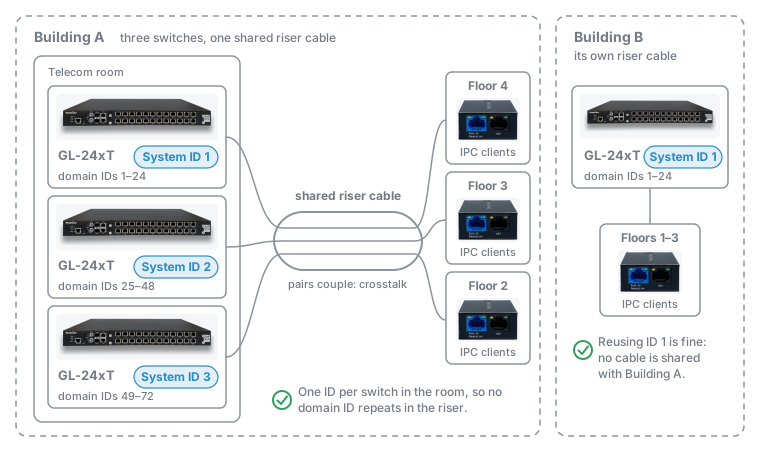
Plan system IDs from the wiring, not from the rack:
- List every switch with ReadyLink ports at the site.
- Group the switches whose ReadyLink cables meet anywhere: the same telecom room, riser cable, conduit, or punch-down block. If you aren't sure whether two switches' cables meet, put them in the same group.
- Within each group, number the switches 1, 2, 3, and so on. GL-2xMT switches in a daisy chain pick their own IDs (see Daisy chains of GL-2xMT switches).
- A group whose wiring never meets another group's can start again at 1.
Record each switch's ID, for example on a faceplate label or in your site notes, so the next switch added to the room gets the next free number. For the site in the diagram:
| Switch | Location | Wiring | System ID | Domain IDs |
|---|---|---|---|---|
| GL-24xT #1 | Building A, telecom room | Shared riser | 1 | 1–24 |
| GL-24xT #2 | Building A, telecom room | Shared riser | 2 | 25–48 |
| GL-24xT #3 | Building A, telecom room | Shared riser | 3 | 49–72 |
| GL-24xT #4 | Building B | Own riser | 1 | 1–24 |
#Daisy chains of GL-2xMT switches
In a daisy chain, one ReadyLink port on a headend switch feeds a line of GL-2xMT switches over a single cable. On a casino slot floor, for example, a GL-24xT in the IDF closet drives one 4-wire cable from its RL1 port. The GL-2xMT in each slot bank's base takes the chain in on its RL1 port and passes it on to the next bank from RL2. Each hop between two switches is its own ReadyLink link, with its own domain ID.
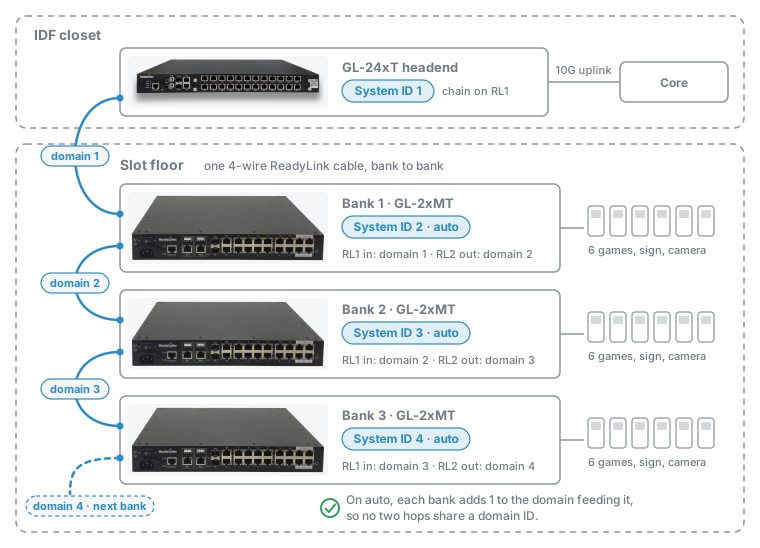
You don't need to number the banks. A GL-2xMT's ID mode is auto by default: once the link on its RL1 port is up, it takes that hop's domain ID, adds 1, and uses the result both as its system ID and as the domain ID it sends out on RL2. Down the chain, the domain IDs count up by one per hop from the headend port's domain ID, so no two hops share one.
- Set the headend's system ID by the rule for the switches in its closet. The chain follows it: a chain on RL1 of a GL-24xT on system ID 2 starts at domain 25, and its banks take 26, 27, and so on.
- Leave every GL-2xMT in the chain on auto. On each bank,
show ghn systemreadsG.hn ID mode : auto, andG.hn system IDis one more than the domain ID of the hop feeding it. - If several chains from one headend share a floor raceway, start them on headend ports far enough apart that their domain IDs don't meet. A chain on RL1 with four banks uses domain IDs 1 to 5, so a second chain in the same raceway should start on RL6 or higher, not on RL2.
- If you change the headend's system ID, the banks follow on their own. Each one restarts its RL2 link as it picks up the change, so the whole chain drops while the change works its way down.
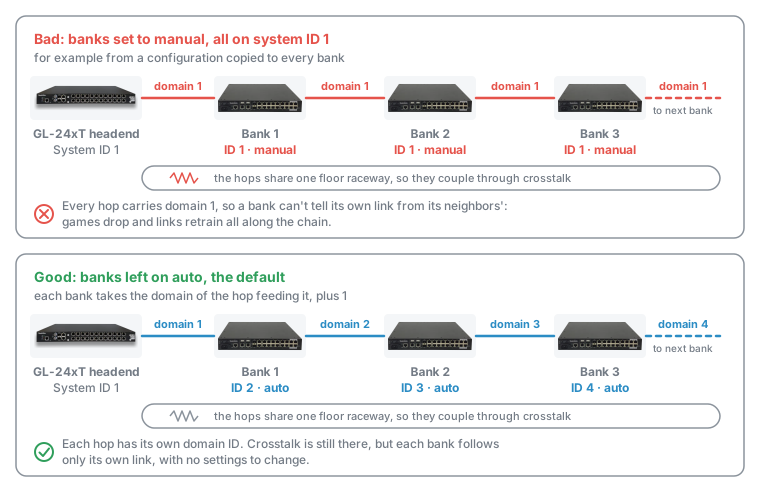
Chains go wrong when banks are switched to manual mode:
- Banks all set to the same ID, for example from a configuration copied to every bank, repeat one domain ID on every hop.
- Numbering the banks 1, 2, 3 by hand also clashes. Bank 1's RL2 then uses domain 1, the same domain as the headend port feeding it.
To put a bank back on auto, run ghn id auto and save:
switch# configure terminal
switch(config)# ghn id auto
The configuration completed successfully.
switch(config)# end
switch# write
Do you want to save the current switch configuration? (y/n): y
Save configuration, please wait...
Save configuration successfully!
If a bank has to stay in manual mode, set it to the domain ID of the hop feeding it plus 1, which is the ID auto mode would pick.
#Why duplicates cause problems
Twisted pairs in the same cable couple into each other (crosstalk), so each line picks up some of its neighbors' signals. When two neighboring lines carry the same domain ID, a client can't tell which signal belongs to its own port.
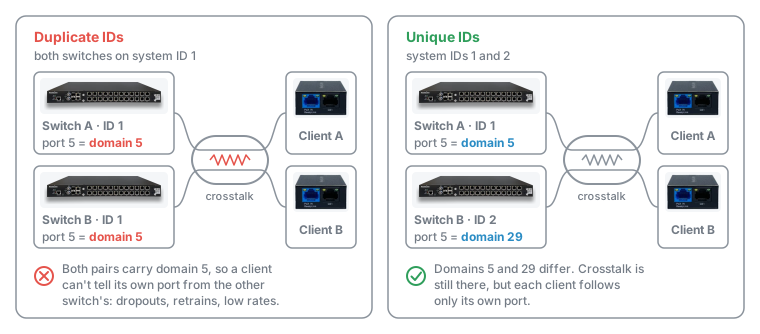
The system ID matters most on twisted pair. Coax is shielded, so neighboring coax runs rarely pick up each other's signal.
#IDs available on each model
| Switch | System IDs |
|---|---|
| Twisted-pair models (GL-xxT, GL-8xTH-RPF, GL-4xTH-RPF) | 1–10 |
| GLx coax models (GL-xxC, GL-xxB) | 1–2 |
| GLxH coax models (GL-8xCH, GL-4xCH-RPF) | 1–7 |
| GL-2xMT | 1–240, picked automatically by default |
The command accepts any number from 1 to 240, but each switch rejects a number above its model's limit and replies The maximum device ID is N. That reply is the authority for the model in front of you.
If a group has more twisted-pair switches than there are IDs, reuse IDs on the switches whose cables are farthest apart, for example switches serving different floors over different riser cables.
#How the system ID maps to domain IDs
The switch works out each ReadyLink port's domain ID from its system ID:
domain ID = (system ID - 1) x (number of ReadyLink ports) + port numberOn a switch with 24 ReadyLink ports:
| System ID | Port 1 | Port 2 | … | Port 24 |
|---|---|---|---|---|
| 1 | 1 | 2 | … | 24 |
| 2 | 25 | 26 | … | 48 |
| 3 | 49 | 50 | … | 72 |
| 10 | 217 | 218 | … | 240 |
The GL-2xMT is the exception. It sends out one domain, on RL2, and that domain ID is the same number as its system ID.
#The ID mode
On the GL-2xMT and a few other models, show ghn system has a G.hn ID mode line with one of two values:
- auto: The default. The switch takes its system ID from the link on its RL1 port: that link's domain ID plus 1 (see Daisy chains of GL-2xMT switches).
ghn systemis refused withPlease set manual mode firstly.until you switch to manual. - manual: You set the system ID with
ghn system.
GLx and GLxH switches only have manual mode. Their show ghn system has no G.hn ID mode line, and ghn id auto replies This feature is not supported on this device.
To switch a GL-2xMT to manual, then set the ID:
switch# configure terminal
switch(config)# no ghn id auto
The configuration completed successfully.
switch(config)# ghn system 2
G.hn system ID has been configed successfully.
The G.hn system ID will take effect about 3 minutes.
ghn id auto turns the automatic mode back on. A GL-2xMT in manual mode has a no ghn id auto line in its saved configuration.
#Check the system ID
ReadyView doesn't show the ReadyLink system ID on the switch page. Read it from the switch CLI, through the proxy terminal in ReadyView, over SSH, or on the serial console (see CLI quick reference), or from the switch's web interface.
#show ghn system
The G.hn system ID line is the switch's ReadyLink system ID:
GL-24xT-P600D# show ghn system
System profile ID: PTP
G.hn slot1 state : online
G.hn slot1 power : on
G.hn slot1 reset : on
G.hn slot2 state : online
G.hn slot2 power : on
G.hn slot2 reset : on
G.hn VectorBoost : disabled
G.hn mode        : SISO 200MHz
G.hn system ID   : 2
G.hn US/DS ratio : 30% : 70%
G.hn mode is the SISO/MIMO setting, not the ID mode. See SISO / MIMO mode.
#show ghn interface
The Master_ID column is each ReadyLink port's domain ID. Use it to confirm a change has been applied and to compare switches with different port counts. On a 24-port switch on system ID 2, the ports read 25 to 48:
GL-24xT-P600D# show ghn interface
Interface Master_ID Link Local_MAC      Remote_MAC     Physical_DS/US_Speed(Mbps) Wire_Length(m) Estimated_XPUT(Mbps) Estimated_XPUT_DS/US(Mbps)
------------------------------------------------------------------------
Ghn1.1    25        up   0013.ba19.170d 0013.ba0a.4c9e 1827/1804                  5(m)            1427(Mbps)          1074/455
Ghn2      26        down 0013.ba19.1007 0000.0000.0000 -/-                        -(m)           -(Mbps)
Ghn3      27        down 0013.ba19.170f 0000.0000.0000 -/-                        -(m)           -(Mbps)
...
Check Master_ID, not the DOMAIN ID column of show ghn summary. That column can read 0 and isn't the value the system ID sets.
#Saved configuration
The saved configuration has a ghn system <id> line only when the ID is something other than 1. A switch with no such line is on system ID 1.
#Web interface
On twisted-pair models, open Configuration → Basic Configuration. The System Device ID field shows the system ID. Coax models don't have this page; use the CLI. To turn on the web interface, see Local management.
#Set the system ID
#CLI
Set the ID in configuration mode, then save it with write. Without write, the switch goes back to its saved ID at the next reboot.
GL-24xT-P600D# configure terminal
GL-24xT-P600D(config)# ghn system 2
G.hn system ID has been configed successfully.
The G.hn system ID will take effect about 3 minutes.
GL-24xT-P600D(config)# end
GL-24xT-P600D# write
Do you want to save the current switch configuration? (y/n): y
Save configuration, please wait...
Save configuration successfully!
After about 3 minutes, run show ghn system and show ghn interface. G.hn system ID shows the new ID, and Master_ID shows the new range.
#Web interface
On twisted-pair models:
- Open Configuration → Basic Configuration.
- Choose the ID in System Device ID and click Apply.
- Open Administration → Save Configuration and save, so the ID survives a reboot.
#Troubleshooting
#Signs of a duplicate system ID
- Clients on two switches in the same room drop or retrain, often on the same port numbers on both switches.
- PHY rates in
show ghn interfaceare far below what the wire length suggests, on lines that share a cable with another switch's lines. - The trouble started when a second switch was added to the room or the riser, or when a bank in a daisy chain was set up by hand.
Run show ghn system on every switch in the group. Two switches with the same port count and the same G.hn system ID share every domain ID. Give one of them a free ID. For switches with different port counts, compare their Master_ID ranges instead. On a daisy chain, check that every GL-2xMT reads G.hn ID mode : auto.
#Messages and behavior
| You see | Meaning | What to do |
|---|---|---|
The maximum device ID is N. | The ID is above this model's limit. | Choose an ID from 1 to N. |
Please set manual mode firstly. | The device is in auto ID mode. | Run no ghn id auto, then ghn system <id>. |
This feature is not supported on this device. after ghn id auto | This model only has manual mode. | Nothing. Set the ID with ghn system <id>. |
G.hn ID mode : manual on a GL-2xMT in a daisy chain | The bank was set by hand and can repeat a neighbor's domain ID. | Run ghn id auto, then write. |
| Every ReadyLink client drops for a few minutes after the change | Each ReadyLink port is restarting with its new domain ID. | Wait about 3 minutes. |
Master_ID still shows the old range | The change hasn't been applied yet. | Wait 3 minutes and check again. |
| The ID is back to the old value after a reboot | The change wasn't saved. | Set it again and run write. |
#If the problem continues
Unique system IDs remove domain ID clashes, but not every source of interference. If clients still drop or run slowly:
- Check each ReadyLink line's PHY rate and wire length with
show ghn interface(see link status). - On long runs, check long reach mode.
- On twisted pair, review VectorBoost.
- If the switches are stacked in one rack, connect their sync cables (see the GLx installation guide).
- Work through the Layer 1–3 troubleshooting tools.
Last updated November 6, 2026